> ## Documentation Index
> Fetch the complete documentation index at: https://frenglish.mintlify.site/llms.txt
> Use this file to discover all available pages before exploring further.
# Cross-App Ecosystem Wallets
> Sequence Ecosystem Wallets allows for the creation of a unified wallet for users across your ecosystem.
Sequence's cross-app solution enables your users to leverage your ecosystem embedded wallets in any app with the same wallet address - regardless of whether they are external to your ecosystem or integrated with Sequence using common wallet connectors like wagmi. This includes:
* External Marketplaces
* External DEX's
* External Applications
 You can see a demo of our cross-app embedded wallet connector [here](https://cross-app-demo-dapp.pages.dev/).
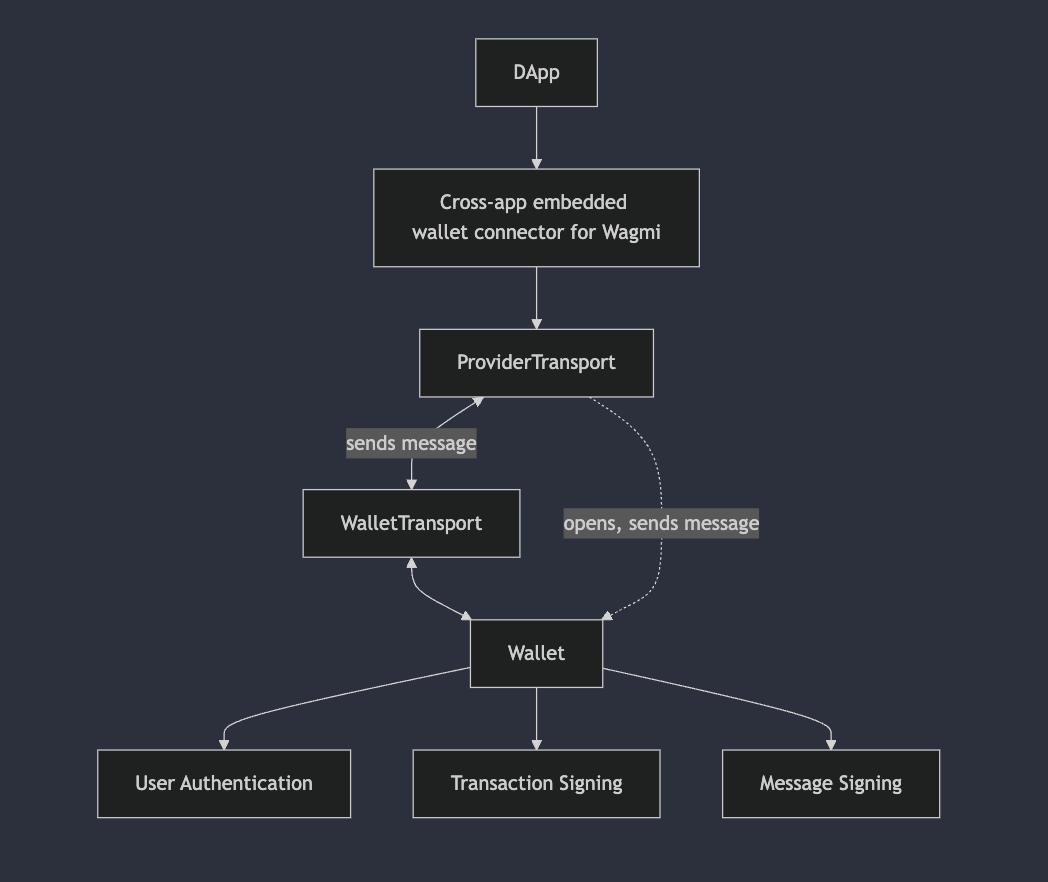
The cross-app embedded wallet implements a communication flow between the external application and the wallet application:
* The external app communicates with the wallet through the cross-app embedded wallet connector for Wagmi
* The connector uses a ProviderTransport to handle communication
* Messages are sent between the ProviderTransport and WalletTransport
* The Wallet component handles three main functionalities:
* User Authentication
* Transaction Signing
* Message Signing
The wallet can be opened and send messages back to the external application through the transport layer, enabling secure cross-application communication. Notably, for a cross-app integration, users will have to confirm all interactions.
```bash theme={null}
git clone https://github.com/0xsequence/cross-app-embedded-wallet/tree/master && cd cross-app-embedded-Wallet/wallet
cp .env.example .env
```
Pass in your ecosystem embedded wallet variables to the `.env` file. Then simply build the wallet application with `pnpm build` and deploy to your preferred such as Cloudflare Pages with a publicly accessible URL.
Now, we'll configure an example external application where we pass in the wallet connector URL to wagmi.
Navigate to the example application and install dependencies, specifically the sequence cross-app connector package `@sequence-wallet/cross-app-connector`:
```bash theme={null}
cd ../dapp && pnpm install
```
Then update the environment variables with our project access key and the hosted wallet URL you deployed previously:
```bash theme={null}
cp .env.example .env
```
Lastly, you can edit the wagmi connector configuration located in `src/wagmiConfig.ts` for your specific wallet. Here's an example configuration that can be provided to the external application:
```
import { sequenceCrossAppEmbeddedWallet } from '@0xsequence/cross-app-embedded-wallet-connector'
import { createConfig, http } from 'wagmi'
import { arbitrumNova, arbitrumSepolia } from 'wagmi/chains'
const urlParams = new URLSearchParams(window.location.search)
const walletAppUrl = urlParams.get('walletAppUrl') ?? import.meta.env.VITE_WALLET_URL
const connector = sequenceCrossAppEmbeddedWallet(
{
projectAccessKey: import.meta.env.VITE_PROJECT_ACCESS_KEY,
walletUrl: walletAppUrl,
chainId: arbitrumNova.id, // Change this to your desired chain
}
);
export const config = createConfig({
chains: [arbitrumNova, arbitrumSepolia],
connectors: [connector],
transports: {
[arbitrumNova.id]: http(), // add Chain ID Transport
[arbitrumSepolia.id]: http()
}
})
```
Now, you can share the wallet connector configuration with any app to allow them to leverage your ecosystem wallet in their application so your using can use their same wallet address.
You can see a demo of our cross-app embedded wallet connector [here](https://cross-app-demo-dapp.pages.dev/).
The cross-app embedded wallet implements a communication flow between the external application and the wallet application:
* The external app communicates with the wallet through the cross-app embedded wallet connector for Wagmi
* The connector uses a ProviderTransport to handle communication
* Messages are sent between the ProviderTransport and WalletTransport
* The Wallet component handles three main functionalities:
* User Authentication
* Transaction Signing
* Message Signing
The wallet can be opened and send messages back to the external application through the transport layer, enabling secure cross-application communication. Notably, for a cross-app integration, users will have to confirm all interactions.
```bash theme={null}
git clone https://github.com/0xsequence/cross-app-embedded-wallet/tree/master && cd cross-app-embedded-Wallet/wallet
cp .env.example .env
```
Pass in your ecosystem embedded wallet variables to the `.env` file. Then simply build the wallet application with `pnpm build` and deploy to your preferred such as Cloudflare Pages with a publicly accessible URL.
Now, we'll configure an example external application where we pass in the wallet connector URL to wagmi.
Navigate to the example application and install dependencies, specifically the sequence cross-app connector package `@sequence-wallet/cross-app-connector`:
```bash theme={null}
cd ../dapp && pnpm install
```
Then update the environment variables with our project access key and the hosted wallet URL you deployed previously:
```bash theme={null}
cp .env.example .env
```
Lastly, you can edit the wagmi connector configuration located in `src/wagmiConfig.ts` for your specific wallet. Here's an example configuration that can be provided to the external application:
```
import { sequenceCrossAppEmbeddedWallet } from '@0xsequence/cross-app-embedded-wallet-connector'
import { createConfig, http } from 'wagmi'
import { arbitrumNova, arbitrumSepolia } from 'wagmi/chains'
const urlParams = new URLSearchParams(window.location.search)
const walletAppUrl = urlParams.get('walletAppUrl') ?? import.meta.env.VITE_WALLET_URL
const connector = sequenceCrossAppEmbeddedWallet(
{
projectAccessKey: import.meta.env.VITE_PROJECT_ACCESS_KEY,
walletUrl: walletAppUrl,
chainId: arbitrumNova.id, // Change this to your desired chain
}
);
export const config = createConfig({
chains: [arbitrumNova, arbitrumSepolia],
connectors: [connector],
transports: {
[arbitrumNova.id]: http(), // add Chain ID Transport
[arbitrumSepolia.id]: http()
}
})
```
Now, you can share the wallet connector configuration with any app to allow them to leverage your ecosystem wallet in their application so your using can use their same wallet address.