In this guide we will go through the process of creating a custom marketplace from a few simple tools from the Sequence stack. The tools will enable you to perform:
  1. Minting: Minting of tokens to your wallet from the Sequence Builder
  2. Wallet Authentication: Use of Web SDK to authenticate a user
  3. Blockchain Queries: Querying of token balances using the Indexer
  4. Multi-wallet Types: Allow users to either use a Sequence Wallet or an EOA
  5. Request Creation: Creation of sell listing requests on the Sequence Market Protocol
  6. Order Accepting: Accepting of top orders from the Marketplace
  7. (Optional) Enable Embedded Wallet: Add a more seamless UX experience with no-confirmation transactions
See an example simplified marketplace dapp that enables users to mint collectibles, sell the collectibles with the Sequence Marketplace Protocol, and make purchases with USDC on base-sepolia by getting a top order from the Marketplace.The code can be found here

1. Minting

The first step is to create a collectible from the Sequence Builder and mint a few tokens, which can be accomplished with this guide and to use the tokenId you minted in the following steps to query and fulfill orders.

2. Wallet Authentication

For your project, you’ll need a way to authenticate your user with a wallet. Your choice from the Sequence stack is to use either an Embedded Wallet for headless and web2-like UX, or a Ecosystem Wallet with Web SDK to reach more types of wallets. For this guide we’ll use an Universal Sequence Wallet with Web SDK connector (with an option for an Embedded Wallet) which can authenticate users using Google or Apple auth, in addition to user brought wallets like Coinbase or Metamask.

Install Packages

Either you can create a vanilla js/html/css project from a template like this for a templated setup, or we will walk you through how to use react from scratch here. Start by creating a project in a folder of your name choosing:
mkdir <project_name>
cd <project_name>
npx create-react-app . --template=typescript
Then, begin by installing the required packages in the <project_name> folder
pnpm install @0xsequence/kit @0xsequence/kit-connectors wagmi ethers viem 0xsequence @tanstack/react-query
Then in src next to index.tsx in the folder, create a config.ts file with the following contents:
import { arbitrumSepolia, Chain } from 'wagmi/chains'
import { getDefaultConnectors } from '@0xsequence/kit-connectors'
import { createConfig, http } from 'wagmi'

const chains = [arbitrumSepolia] as [Chain, ...Chain[]]

const projectAccessKey = process.env.REACT_APP_PROJECTACCESSKEY!;
const walletConnectProjectId = process.env.REACT_APP_WALLETCONNECTID!;

const connectors = getDefaultConnectors( "universal", {
    walletConnectProjectId: walletConnectProjectId,
    defaultChainId: 421614,
    appName: 'demo app',
    projectAccessKey
})

const transports: any = {}

chains.forEach(chain => {
    transports[chain.id] = http()
})

const config = createConfig({
    transports,
    connectors,
    chains
})

export { config }

Be sure to include a .env file in the root of your project to include client secrets
Next, import the config to be consumed by the WagmiProvider in the index.tsx
import ReactDOM from "react-dom/client";
import { KitProvider } from "@0xsequence/kit";
import { QueryClient, QueryClientProvider } from "@tanstack/react-query";
import { WagmiProvider } from "wagmi";
import App from './App'

import { config } from "./config";

const root = ReactDOM.createRoot(
  document.getElementById("root") as HTMLElement,
);

const queryClient = new QueryClient();

function Dapp() {
  return (
    <WagmiProvider config={config}>
      <QueryClientProvider client={queryClient}>
        <KitProvider config={{ defaultTheme: "light", signIn: { showEmailInput: false } }}>
          <App />
        </KitProvider>
      </QueryClientProvider>
    </WagmiProvider>
  );
}

root.render(
      <Dapp />
);
And finally, add a button in the App.tsx to make the Web SDK modal appear
import { useOpenConnectModal, useKitWallets } from "@0xsequence/kit";

function App() {
  const { address } = useAccount();
  const { setOpenConnectModal } = useOpenConnectModal();
  const {
    wallets, // Array of connected wallets
    linkedWallets, // Array of linked wallets (for embedded wallets)
    setActiveWallet, // Function to set a wallet as active
    disconnectWallet, // Function to disconnect a wallet
  } = useKitWallets();

  const isConnected = wallets.length;

  const connect = async () => {
    setOpenConnectModal(true);
  };

  return (
    <>
      {!isConnected && <button onClick={() => connect()}>Connect</button>}
      {address && address}
    </>
  );
}

export default App;
Great! You should have an application that can authorize a user and return a wallet address. You can now test it with:
pnpm run start

3. Blockchain Queries

Once you have one or a few collectibles minted, you can query the data from the contract address from your deployment, which can be found here:
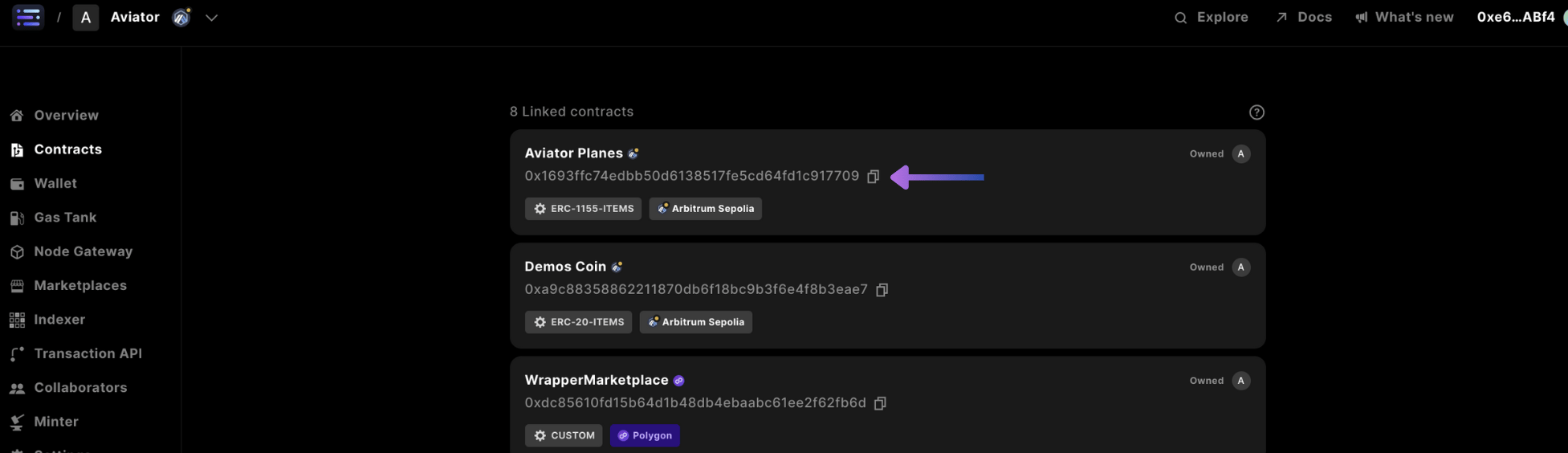
copy contract address
You can query data using the indexer, using this code where an account address and contract address (retrieved from the Sequence Builder deployed contract) are inputted into the indexer api This will be important when you’re determining a tokenID to create a request on the marketplace, for this demo we’ll assume you’re dealing with a single tokenID
// Works in both a Webapp (browser) or Node.js:
import { SequenceIndexer } from "@0xsequence/indexer";

const indexer = new SequenceIndexer(
  "https://arbitrum-sepolia-indexer.sequence.app",
  "<access-key>"
);

// try any contract and account address you'd like :), as an example
const contractAddress = "<your_deploy_contract_address"; // "0x1693ffc74edbb50d6138517fe5cd64fd1c917709";
const accountAddress = address; // "0xc2be9cf6d9ee4fd211f88620760e829792659b16";

// query Sequence Indexer for all nft balances of the account on Polygon
const nftBalances = await indexer.getTokenBalances({
  contractAddress: contractAddress,
  accountAddress: accountAddress,
  includeMetadata: true,
});

console.log("collection of items:", nftBalances);
Where the response of the indexer call, yields the follow data:
  • contractType (string) - the type of contract type (i.e. ERC20, ERC721, or ERC1155)
  • contractAddress (string) - the contract address of the token
  • accountAddress (string) - the deploying account address
  • tokenID (string) - the tokenID of the token (always 0 if ERC20)
  • balance (string) - the balance of the token
  • blockHash (string) - the transaction merkle hash of the block when the token was deployed
  • blockNumber (number) - the blocknumber the token was deployed
  • chainId (number) - the chain id of the token
  • contractType
    • chainId (number) - the chain id of the token
    • address (string) - the address of the token
    • name (string) - contract level name of the token
    • type (string) - the type of contract type (i.e. ERC20, ERC721, or ERC1155)
    • symbol (string) - the symbol of the token
    • decimals (number) - the number of decimals the token has
    • logoURI (string) - the logo of the token displayed in sequence.app
    • deployed (boolean) - whether the token is deployed
    • bytecodeHash (string) - hash of the bytecode of a smart contract deployed on the blockchain
    • extensions
      • link (string) - the adjoining website to link to the project
      • description (string) - the metadata description of the token
      • ogImage (string) - the banner image for the token, rendered in sequence.app
      • originChainId (number) - the originating chain id the token represents
      • originAddress (string) - the originating contract address the token represents
      • verified (boolean) - whether the token is verified and trusted
      • verifiedBy (string) - the verifing source as to why this is not spam
  • updatedAt (date) - the last time the indexer was updated
  • tokenMetadata
    • tokenId (string) - the tokenID of the token (always 0 if ERC20)
    • contractAddress (string) - the contract address of the token
    • name (string) - token level name
    • description (string) - the description of the token
    • image (string) - the image as a url of the token
    • decimals (string) - the number of decimals for the token
    • properties (object) - an object containing the properties of the token metadata
    • external_url (string) - an external url for where to find the token or more details
    • updatedAt (date) - the last time the token metadata was updated

4. Multi-wallet Types

Due to the fact that we’re using Web SDK for this example that allows you to use a Sequence wallet, in addition to your own brought EOA wallet, sending transactions to the blockchain will differ due to the fact that with a Sequence wallet, you can send batch transactions to optimize gas costs, whereas with wagmi using an EOA you can only send 1 transaction at a time. To accomplish this, we take a few steps to create a local state variable that checks for the authorized wallet
import { useEffect } from "react";
import { useConnect, useAccount } from "wagmi";

function App() {
  const { isConnected } = useAccount();
  const { connectors } = useConnect();
  const [isSequence, setIsSequence] = useState<boolean>(false);

  useEffect(() => {
    connectors.map(async (connector) => {
      if ((await connector.isAuthorized()) && connector.id === "sequence") {
        setIsSequence(true);
      }
    });
  }, [isConnected]);
}
In the Sequence Market protocol, when you create a listing, it’s referred to as a request, and when you accept a request it’s called an order.

5. Request Creation

For this example, we’ll be using Arbitrum Sepolia USDC from the community faucet Head over there to first get some tokens, so that you can make listing with your request
Then, in order to create a request for the orderbook, we’ll need to first make sure we enable the marketplace orderbook contract with approval to transfer your tokens First, we check that the marketplace is approved for the contract, with some logic
const ERC1155Contract = '0x1693ffc74edbb50d6138517fe5cd64fd1c917709'
const MarketPlaceContract = '0xfdb42A198a932C8D3B506Ffa5e855bC4b348a712'

function App() {

  async function checkERC1155Approval(ownerAddress: string, operatorAddress: string) {
    const abi = [
      "function isApprovedForAll(address account, address operator) external view returns (bool)"
    ];
    const provider = new ethers.providers.JsonRpcProvider(`https://nodes.sequence.app/arbitrum-sepolia/${process.env.REACT_APP_PROJECT_ACCESSKEY}`);
    const contract = new ethers.Contract(ERC1155Contract, abi, provider);
    return await contract.isApprovedForAll(ownerAddress, operatorAddress);
  }

  const createRequest = async () => {
      ...
    if(await checkERC1155Approval(address!,MarketPlaceContract)){
      // is approved and only requires a single transaction
      ...
    } else { // is not approved, so requires multiple transactions

      if(isSequence) { .. perform multi-batch transactions
        ...
      } else { // is not a sequence wallet
        ...
      }
    }
  };

}
Next, we’ll need to craft the transaction with the correct ABI to generate the expected calldata for the various paths of: not being approved versus approved, and if it is a sequence wallet or not.
const [requestData, setRequestData] = useState<any>(null);

const createRequest = async () => {
  const sequenceMarketInterface = new ethers.Interface([
    "function createRequest(tuple(bool isListing, bool isERC1155, address tokenContract, uint256 tokenId, uint256 quantity, uint96 expiry, address currency, uint256 pricePerToken)) external nonReentrant returns (uint256 requestId)",
  ]);

  const amountBigNumber = ethers.parseUnits(String("0.01"), 6); // ensure to use the proper decimals

  const request = {
    isListing: true,
    isERC1155: true,
    tokenContract: ERC1155Contract,
    tokenId: 1,
    quantity: 1,
    expiry: Date.now() + 7 * 24 * 60 * 60 * 1000, // 1 day
    currency: ArbSepoliaUSDCContract,
    pricePerToken: amountBigNumber,
  };

  const data = sequenceMarketInterface.encodeFunctionData("createRequest", [
    request,
  ]);

  setRequestData(data); // we'll need this in the next step

  if (await checkERC1155Approval(address!, MarketPlaceContract)) {
    // is approved and only requires a single transaction

    sendTransaction({
      to: MarketPlaceContract,
      data: `0x${data.slice(2, data.length)}`,
      gas: null,
    });
  } else {
    // is not approved, so requires multiple transactions

    const erc1155Interface = new ethers.Interface([
      "function setApprovalForAll(address _operator, bool _approved) returns ()",
    ]);

    // is not approved
    const dataApprove = erc1155Interface.encodeFunctionData(
      "setApprovalForAll",
      ["0xfdb42A198a932C8D3B506Ffa5e855bC4b348a712", true]
    );

    const txApprove = {
      to: ERC1155Contract,
      data: dataApprove,
    };

    const tx = {
      to: MarketPlaceContract,
      data: data,
    };

    if (isSequence) {
      const wallet = sequence.getWallet();
      const signer = wallet.getSigner(421614);

      try {
        const res = signer.sendTransaction([txApprove, tx]);
        console.log(res);
      } catch (err) {
        console.log(err);
        console.log("user closed the wallet, or, an error occured");
      }
    } else {
      // is not a sequence wallet
      // todo: implement mutex

      sendTransaction({
        to: ERC1155Contract,
        data: `0x${dataApprove.slice(2, data.length)}`,
        gas: null,
      });
      // still need to send acceptRequest transaction
    }
  }
};
Finally, for the path where the transaction does not take place from a sequence wallet and is not approved, we must submit a transaction once there is a transaction receipt from the useSendTransaction hook using a mutex to confirm which transaction the hash came from. This is done in a react useEffect function.
In computer programming, a mutual exclusion (mutex) is a program object that prevents multiple threads from accessing the same shared resource simultaneously.
import { useSendTransaction } from 'wagmi'
import { useMutex } from 'react-context-mutex';

function App() {
  ...
  const [requestData, setRequestData] = useState<any>(null)
  const { data: hash, sendTransaction } = useSendTransaction()
  const MutexRunner = useMutex();
  const mutexApproveERC1155 = new MutexRunner('sendApproveERC1155');

  const createRequest = async () => {
    ...
    if(await checkERC1155Approval(address!,MarketPlaceContract)){
      ...
    } else {
      if (isSequence) { // is a sequence wallet
        ...
      } else { // is not a sequence wallet
        mutexApproveERC1155.lock()
        sendTransaction({
          to: ERC1155Contract,
          data: `0x${dataApprove.slice(2,data.length)}`,
          gas: null
        })
      }
    }
  };

  useEffect(() => {
    if (mutexApproveERC1155.isLocked() && hash) {
      sendTransaction({
        to: MarketPlaceContract,
        data: `0x${requestData.slice(2, requestData.length)}`,
        gas: null,
      });
      mutexApproveERC1155.unlock();
    }
  }, [requestData, hash]);
Great you’re done creating requests to the Sequence Market protocol, now you can implement a button and try the flow.

6. Order Accepting

Now that we have an order on the marketplace, we need to do a few things:
  • Query the Marketplace: query the marketplace for an orderId that you want to accept an order for
  • Currency Balance: check for currency balance using the indexer
  • Token Approval: check for currency approval for the marketplace to transfer tokens

Query the Marketplace

Lets query the marketplace orderbook to get the pricePerToken and orderId the order is for
  const getTopOrder = async (tokenID: string) => {
    const res = await fetch(
      "https://marketplace-api.sequence.app/arbitrum-sepolia/rpc/Marketplace/GetTopOrders",
      {
        method: "POST",
        headers: {
          "Content-Type": "application/json",
        },
        body: JSON.stringify({
          collectionAddress: ERC1155Contract,
          currencyAddresses: [ArbSepoliaUSDCContract],
          orderbookContractAddress: MarketPlaceContract,
          tokenIDs: [tokenID],
          isListing: true,
          priceSort: "DESC", // descending based on price to get lowest offer first
        }),
      },
    );
    const result = await res.json();
    return result.orders[0] // getting the first order from the list
  }

  const acceptOrder = async () => {
    const tokenID = '1'
    const topOrder: any = await getTopOrder(tokenID)
    const requiredAmount = topOrder.pricePerToken
    ...
    if(await checkERC20Balance(requiredAmount)){
      ...
    } else {
      ...
    }
  }

Currency Balance

We’ll use the indexer to query the balance and see if the user has enough token to pay for the order. This can be accomplished with the following code:
You’ll need to make sure when you perform an equality check on the token contract address, that it is inputted as all lowercase
import { SequenceIndexer } from '@0xsequence/indexer'
...
const checkERC20Balance = async (requiredAmount: any) => {
    const indexer = new SequenceIndexer('https://arbitrum-sepolia-indexer.sequence.app', process.env.REACT_APP_PROJECT_ACCESSKEY)

    const contractAddress = ArbSepoliaUSDCContract
    const accountAddress = address

    const tokenBalances = await indexer.getTokenBalances({
      contractAddress: contractAddress,
      accountAddress: accountAddress,
    })

    let hasEnoughBalance = false

    tokenBalances.balances.map((token) => {
      const tokenBalanceBN = ethers.BigNumber.from(token.balance);
      const requiredAmountBN = ethers.BigNumber.from(requiredAmount);
      if(token.contractAddress == ArbSepoliaUSDCContract && tokenBalanceBN.gte(requiredAmountBN)){
        hasEnoughBalance = true
      }
    })

    return hasEnoughBalance

}

const acceptOrder = async () => {
  const tokenID = '1'
  const topOrder: any = await getTopOrder(tokenID)
  const requiredAmount = topOrder.pricePerToken
  ...
  if(await checkERC20Balance(requiredAmount)){
  ...
  } else {
  ... // provide prompt on screen that user does not have balance
  }
}

Token Approval

Next, we’ll check for token approval for the Marketplace to be able to transfer the currency token
  const checkERC20Approval = async (ownerAddress: string, spenderAddress: string, tokenContractAddress: string, requiredAmount: string) => {
    const abi = [
      "function allowance(address owner, address spender) external view returns (uint256)"
    ];

    const provider = new ethers.providers.JsonRpcProvider(`https://nodes.sequence.app/arbitrum-sepolia/${process.env.REACT_APP_PROJECT_ACCESSKEY}`);
    const contract = new ethers.Contract(tokenContractAddress, abi, provider);
    const allowance = await contract.allowance(ownerAddress, spenderAddress);

    const requiredAmountBN = ethers.BigNumber.from(requiredAmount);
    const allowanceBN = ethers.BigNumber.from(allowance);

    return allowanceBN.gte(requiredAmountBN);
  }

  const acceptOrder = async () => {
    const tokenID = '1'
    const topOrder: any = await getTopOrder(tokenID)
    const requiredAmount = topOrder.pricePerToken

    if(await checkERC20Balance(requiredAmount)){
      if(!(await checkERC20Approval(address!,MarketPlaceContract,ArbSepoliaUSDCContract,requiredAmount))){
        ...
      } else {

      }
      else {

      }
    }
  }
Finally, we’ll complete the needed logic with actually sending a transaction to the blockchain We begin with the same flow as before, accounting for sending multi-batch transaction if it’s a sequence wallet and not approved, or, if the Marketplace is approved to spend your tokens, only submitting a single transaction
  ...
  const mutexApproveERC20 = new MutexRunner('sendApproveERC20');
  ...
  const acceptOrder = async () => {
    const topOrder: any = await getTopOrder('1')
    const requiredAmount = topOrder.pricePerToken

    const sequenceMarketInterface = new ethers.Interface([
      "function acceptRequest(uint256 requestId, uint256 quantity, address recipient, uint256[] calldata additionalFees, address[] calldata additionalFeeRecipients)",
    ]);

    const quantity = 1
    const data = sequenceMarketInterface.encodeFunctionData(
      "acceptRequest",
      [topOrder.orderId, quantity, address, [], []],
    );

    setAcceptData(data) // we'll need this later, only for Web SDK enabled transactions

    const tx = {
      to: MarketPlaceContract, // 0xfdb42A198a932C8D3B506Ffa5e855bC4b348a712
      data: data
    }

    if(await checkERC20Balance(requiredAmount)){
      if((await checkERC20Approval(address!,MarketPlaceContract,ArbSepoliaUSDCContract,requiredAmount))){
        sendTransaction({
          to: MarketPlaceContract,
          data: `0x${data.slice(2,data.length)}`,
          gas: null
        })
      } else {
        ...
        const erc20Interface = new ethers.Interface([
          "function approve(address spender, uint256 amount) external returns (bool)"
        ]);

        const spenderAddress = "0xfdb42A198a932C8D3B506Ffa5e855bC4b348a712";
        const maxUint256 = ethers.constants.MaxUint256;
        const dataApprove = erc20Interface.encodeFunctionData("approve", [spenderAddress, maxUint256]);

        if(isSequence){
          const wallet = sequence.getWallet()
          const signer = wallet.getSigner(421614)

          const txApprove = {
            to: ArbSepoliaUSDCContract, // The contract address of the ERC-20 token, replace with actual contract address
            data: dataApprove
          };

          try {
            const res = await signer.sendTransaction([txApprove, tx])
            console.log(res)
          } catch (err) {
            console.log(err)
            console.log('user closed the wallet, or, an error occured')
          }
        } else {
          mutexApproveERC20.lock()

          sendTransaction({
            to: ArbSepoliaUSDCContract,
            data: `0x${dataApprove.slice(2,dataApprove.length)}`,
            gas: null
          })
        }
      }
    }
Then in the flow for not being a sequence wallet and requiring approval, we’ll include another useEffect with the mutex check implemented like before
  ...
  const { data: hash, sendTransaction } = useSendTransaction()
  ...
  useEffect(() => {
    if (acceptData && mutexApproveERC20.isLocked()) {
      sendTransaction({
        to: MarketPlaceContract,
        data: `0x${acceptData.slice(2, acceptData.length)}`,
        gas: null,
      });
      mutexApproveERC20.unlock();
    }
  }, [hash, acceptData]);
Great, everything is complete if you add the function click handler attached to a button

7. (Optional) Integrate Embedded Wallet into Web SDK

In order to make your Web SDK connector as Embedded Wallet enabled, we’ll need to install a few package version and update our config.ts we used at the beginning of the guide The Embedded Wallet feature allows no-confirmation transactions, which can create a smoother UX
pnpm i @0xsequence/kit@2.0.5-beta.9 @0xsequence/kit-connectors@2.0.5-beta.9
// config.ts
import { arbitrumSepolia, Chain } from "wagmi/chains";
import { getDefaultWaasConnectors } from "@0xsequence/kit-connectors"; // updated
import { createConfig, http } from "wagmi";
import { getKitConnectWallets } from "@0xsequence/kit"; // updated

const chains = [arbitrumSepolia] as [Chain, ...Chain[]];

// added environment variables
const projectAccessKey = process.env.REACT_APP_PROJECTACCESSKEY!;
const waasConfigKey = process.env.REACT_APP_WAASCONFIGKEY!;
const googleClientId = process.env.REACT_APP_GOOGLECLIENTID!;
const appleClientId = process.env.REACT_APP_APPLECLIENTID!;
const walletConnectProjectId = process.env.REACT_APP_WALLETCONNECTID!;
const appleRedirectURI = "https://" + window.location.host; // note: update slug to include correct homepage

const connectors = [
  ...getDefaultWaasConnectors({
    // updated connector type
    walletConnectProjectId: walletConnectProjectId,
    defaultChainId: 421614,
    waasConfigKey,
    googleClientId,
    appleClientId,
    appleRedirectURI,
    appName: "demo app",
    projectAccessKey,
    enableConfirmationModal: false,
  }),
  ...getKitConnectWallets(projectAccessKey, []),
];

const transports: any = {};

chains.forEach((chain) => {
  transports[chain.id] = http();
});

const config = createConfig({
  transports,
  connectors,
  chains,
});

export { config };
The last step, is to make sure to update our team with the Google and Apple authorized URLs (e.g. http://localhost:3000) to call the Embeded Wallet login flow from